Serious Sam 3: BFE Steam Gift
无法在中国激活
在 南美洲 激活
即时发货 · 密钥更换
已验证适用于 China · 人工客服
描述
Serious Sam 3: BFE Steam Gift Platform: Steam Release Date: 22/11/2011 产品描述 Serious Sam 3: BFE是一个光荣的回放,为男子为第一人称射手的黄金时代,掩护是业余球员,并扣下扳机让事情变得繁荣.
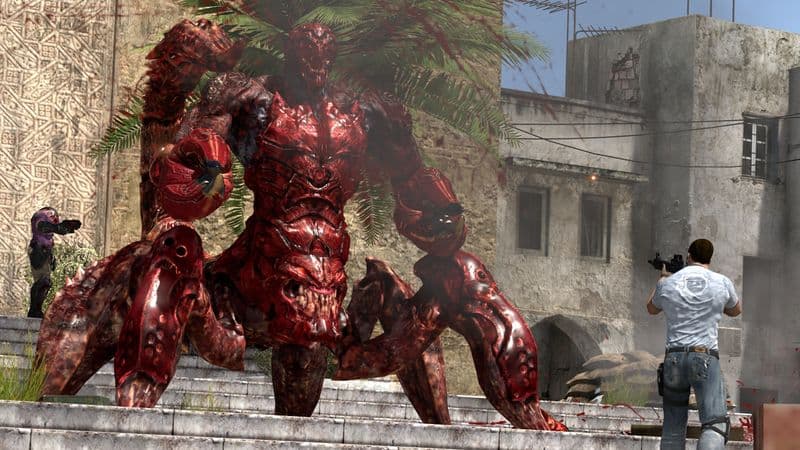
Serious Sam: The First En Confight, Serious Sam 3 是在地球与精神组织入侵的野兽和雇佣兵进行最后斗争期间发生的。 面对古代文明倒塌的寺庙和22世纪埃及倒塌的城市,"严肃的萨姆3"是一个令人振奋的融合,其中包含了经典的抽搐枪手和现代游戏游戏特征. 没有盖尔。 Frantic Arcade-Style Action — — 扣下扳机,浪费在精神的野蛮野兽对攻击者或脸部的无休止的攻击上。 没有掩护系统,没有露营,只有你反对他们。 一切众生. 恐怖的敌人克瑞特斯 — — 一支由令人难忘的走狗组成的新营,包括一团一团一团的斯克瑞杰(Scrapjack)和高耸起的克努姆(Khnum),加入了传奇般的无头卡米卡泽(Kamikaze ) 、 格纳尔(Gnaar)和西里安·韦尔布尔(Sirian Werebull),以创造出你曾经有过的最激烈的反对者,他们都乐于击倒。 相貌环境 — — 跨越近未来埃及在完全混乱的接缝上爆发的广阔战场的战斗. 明日被摧毁的城市 与古代世界被摧毁的神庙相接而来 成为了你们的毁灭之地 破坏型阿森纳 — — 释放出严肃的萨姆的武器库,包括一把瞄准镜突击步枪,双管猎枪,爆炸式自动猎枪,惩罚性迷你枪和全能的火炮弹! 立即携带Sam的所有武器, 野蛮的梅莉 攻击 - 当事情变得艰难, 撕开一个关上Gnaar的眼睛, 扭曲了可怕的Scrapjack的脸 或者断断了一个Arachnoid Hatchling的脖子 以便立即杀死。 共同 Op 混乱 - 并消灭所有跨越12个层面的伤害。 在无情的求生模式中,在敌人浪潮后努力活命,或者在野兽猎杀模式中进行可怕的猎杀! 纯粹多玩家 Mayhem – 放下格斗并让猛烈的条令以不可思议的方式飞来飞去,对阵模式包括死亡赛(Deathmatch, Caption the Flag, Last Team standing and My Bunden). 这是下一个关卡 严肃山姆多人游戏 和所有的地狱即将松开!
Split Screen Modes – Huddle上架,采用分屏合作和多玩模式对战,一个屏幕上最多有4个玩家. 别看我的屏幕! 系统要求 PC系统要求 OS: Windows XP 32-bit (带有服务包 2或3) 处理器:来自Intel或AMD的双分数 2.0 GHz 内存:1 GB 图形:n Vidia Ge Force 7800/7900/8600 系列,ATI/AMD Radeon HD 2600/3600 或 1800/X 1900 系列 Direct=9.0 c 硬盘空间 硬盘音响:4 GB 相容可容可容可容可容可容可容可容可容可容可容可相容可容可容可容可容可容可容可容可容可容可容可容可容可相容可容可容可容可容可容可容可容可容可容可容可容可容可容可容可容可容可容可容可容可容可容可容可容可容可容可容可容可容可容可容可容可容可容可容可容可容可容可容可容可容可容可容可 不支持英特尔集成GPU.
Linux / Steam OS系统要求 OS: Linux Ubuntu 12.04 处理器:来自Intel或AMD的双分数 以 2.8 GHz 内存: 2 GB 图形:n Vidia Ge Force 8600/9600 GT,ATI/AMD Radeon HD 2600/3600(图形驱动器:n Vidia 310,AMD 12.11) Open GL: 2.1 硬盘: 4 GB 免费硬盘 空格 音效: Open AL 兼容音效卡
详情
- 平台
Steam · PC
- 产品类型
- CD_KEY
- 地区
- SAM
- 类型
- Action, FPS
- 开发商
- Croteam
- 发行商
- Devolver Digital
- Metacritic评分
- 72/100
- 语言
- 8


如何在以下平台激活您的密钥 Steam
"Please remember that we are NOT responsible for any problems that may arise from purchasing and using Steam Gifts.
You are doing it at your own risk.
"Please note, that due to recent Valve Steam Gift policy update Steam Gifts for games that are covered by VAC ban program can no longer be added to Inventory.
Make sure that you are logged in to the proper account before entering the link as Steam Gifts can be only added to your library or rejected.
How do I use a Steam gift given to me?
If you do not already have Steam, download and install Steam here.
Once you have Steam installed, you will be prompted to create an account or login to an existing Steam account.
If you do not have an account, please create one.
You will receive an e-mail containing a link that will open Steam allowing you to redeem your gift.
After clicking the link, you will receive a notification at the top right corner in the Steam client informing that you have a new gift.