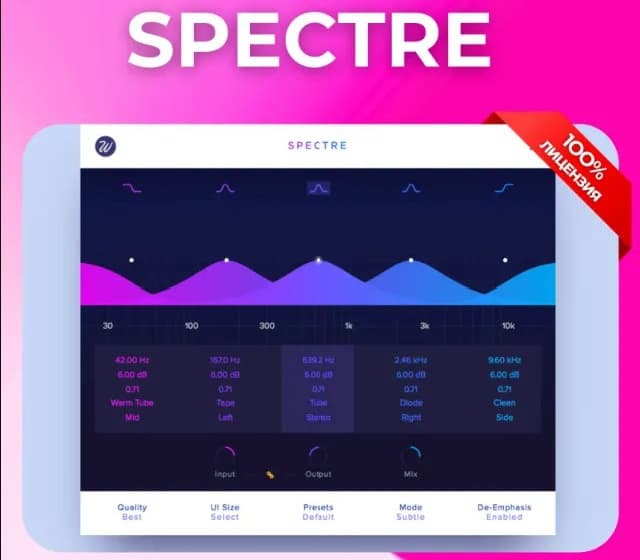
Wavesfactory Spectre PC/MAC CD Key
Software
Works in your region
United States
Instant delivery · key replacement
Verified for United States · human support
Description
Wavesfactory Spectre: The Ultimate Harmonic Enhancer Spectre is a unique sound-shaping tool that combines the best features of a sonic enhancer with a graphical parametric EQ.
Unlike traditional EQs that simply boost volume, Spectre introduces new harmonic content, bringing dull recordings to life with warmth, clarity, and "shimmer".
Key Features 10 High-Quality Algorithms: Choose from Tube, Warm Tube, Solid State, Tape, Diode, Class B, Bit, Digital, Rectify, and Half Rectify to color your sound.
Parallel EQ Workflow: Spectre processes the difference between the dry and EQ’d signal, ensuring your boosts feel extremely natural and musical.
Multi-Band Precision: Five independent bands, each with its own saturation type and adjustable Q settings.
Pristine Audio Quality: Features optional 4 x and 16 x oversampling modes to eliminate aliasing and ensure high-end fidelity.
Mid/Side Matrix: Perfect for focusing bass in the center or widening your stereo image during mastering.
Details
- Platform
Other · PC
- Product type
- Software
- Region
- GLOBAL
- Genre
- Software
- Languages
- 1

System Requirements
Windows
- Windows 7, 8 or 10. 64 bit DAW and OS. 64-Bit Only: This software does not support 32-bit systems or legacy 32-bit DAWs.
Mac
- MinimummacOS 10.7 or higher Recommended: macOS 10.9 or higher (widely cited for 1.5 update and later) Apple Silicon: Native support is included
Activation Instructions
Download and Installation Step 1: Go to the official product page: www.wavesfactory.com/audio-plugins/spectre/ Step 2: Click on the "Free Download" or "Demo" button to download the installer for your operating system (Windows or macOS).
Step 3: Run the installer and follow the on-screen instructions to complete the installation on your computer. 2.
License Activation Step 4: Open your Digital Audio Workstation (DAW) like FL Studio, Ableton Live, Logic Pro, or Cubase.
Step 5: Load the Spectre plugin onto any audio track.
Step 6: When the plugin interface opens, a window will appear asking for activation.
Step 7: Enter the Email Address associated with the purchase and the Serial Key (License Key) provided.
Step 8: Click the "Activate" button.
The plugin will verify the key online and unlock the full version immediately.