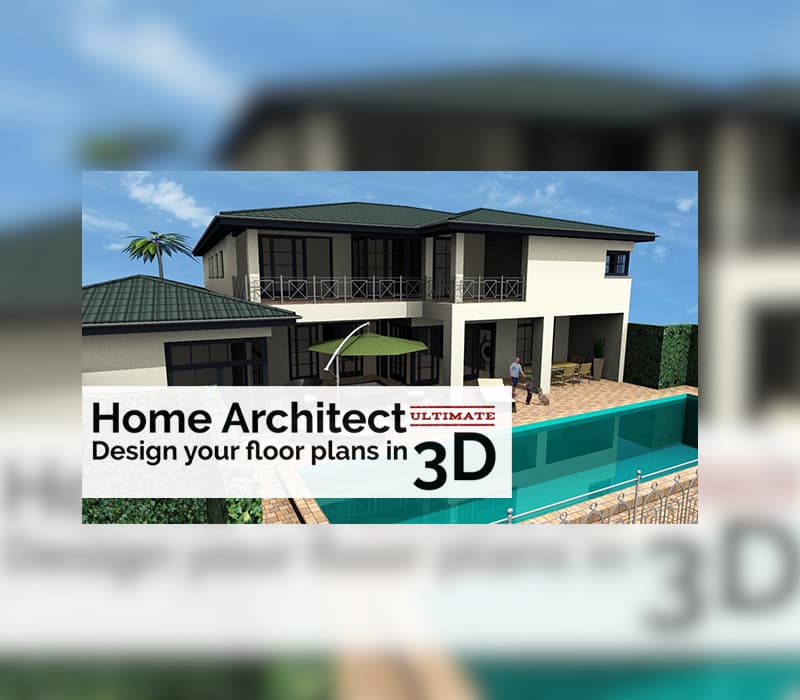

Home Architect Ultimate Edition Steam CD Key
Instant delivery · key replacement
Verified for United States · human support
- Platform
- Steam
- Region
- GLOBAL
- Product type
- Software
- Languages
- 10
Following the success of previous editions of Home Architect – Design your floor plans in 3 D, the acknowledged architecture software is now available in its ULTIMATE Edition, to go even further in your project creation.In this Ultimate edition, you have at your disposal complete and professional tools for your house creation and additional features to customize every detail of your construction.
Features 2 D IMPORT AND EXPORT in 2 D-DXF and 2 D-DWG formats JOINERY CREATION AND CUSTOMIZATION TOOL: design and customize each window’s shape, frame, size, material, structure… save customized joineries in the catalogue export all measurements and features of each window in PDF, RTF and Excel ADDITIONAL FEATURES FOR THE BILL OF QUANTITIES: living space area calculation (according to each country’s regulations) area calculation for construction element: porch, roof, facade, wall, ceiling and floor export in PDF, RTF and Excel facade cladding area calculation and export in PDF CUSTOMIZABLE 2 D & 3 D VIEWS: extended 2 D fill properties to visualize textures and materials in simultaneously all 2 D views customize your plans with your own patterns (2 D symbols, hatches and extended line types) advanced view options: choose to hide furniture, joineries, roofs… in one click by creating your own templates easily change, sort and arrange layers in the project tree ROOFS: merge roofs easily to create even the most particularly shaped ones solar plants creation: elevated or flat solar panels, adjust gradient and orientation extended timber construction for roofs dormers: move and copy them for saving time add & remove roof polygon points to simply change its shape STAIRS: additional options for handrail, baluster and banister customization ALTERNATIVE SNAP TOOL: guides to align elements of the project LIBRARY EXCLUSIVE TO THE ULTIMATE EDITION: 5, 000 3 D objects 25, 000 textures ADDITIONAL & EXCLUSIVE FEATURES edit depth of section views improved apartment management: have a quick overview of the composition and arrangement keyboard shortcuts to copy/paste elements button in the upper toolbar to show/hide the ceiling AS WELL AS ALL THE CONTENT OF THE PREMIUM EDITION Your 3 D objects imported and converted: in .skp (up to Sketch Up 2016), .dae, .fbx, .3 ds, .vrml and .obj formats, import from 3 D Warehouse …Or create your own objects directly in 3 D Complete your 2 D floor plans in full detail: add lines, polygons, circles, arches… And your own 2 D symbols 2 D plan layout, multiple views on one plan Extended wall claddings: metal sheet, 3 D embossed design… Extended roof features: roof extensions, openings, patios, cladding, purlin roofs, hall construction… Create your own light sources Scan your plans and import them to recreate your projects more easily and accurately Technical network plans creation with 2 D symbols and 3 D objects 2 D/3 D FLOOR PLAN Simultaneous 2 D and 3 D editing Advanced 3 D rendering with lighting management according to your time and location Orientation according to cardinal points for sunshine Raytracing realistic 3 D rendering with lighting management BUILDINGS AND ROOFS Dozens of existing projects to get inspired Wall customization according to their type and material Create unlimited floors and buildings: from basement to attic!
Complex and customizable roofs Skylight windows, dormers, fireplaces, solar panels… HOUSE ARRANGEMENT Thousands of items and furniture Customize hundreds of existing textures or import your own!
Outdoor: patios, conservatories, swimming pools, gazebos, garages, benches, barbecues… Realistic panorama : add your own background pictures for a more authentic rendering PROFESSIONAL TOOLS 2 D layout with customizable cross section plans for building permits Surface editor: creation of earthenware, tile, baseboard, border strip surfaces… Customizable staircase with railing and stairwell options Land and terrain editor: creation of pathway, stream, plateau, mound and ditch, height points...
Bill of quantities detailed for every room and material 2 D plans and 3 D images export in .jpg, .png, .bmp and .gif formats TUTORIALS Illustrated guide with a glossary Step by step video tutorials to create your first project in one hour flat!
Developer
Shine Research
Publisher
Nacon
Release Date
10/25/2017
Languages


System Requirements
Windows
- Minimum: OS: Windows 7, Windows 8, Windows 8.1, Windows 10 Processor: Pentium 4 or equivalent Memory: 4 GB RAM Graphics: OpenGL Storage: 2 GB available space
Related Games
See more Steam
Home Design 3D Ultimate Bundle PC Steam CD Key

RPG Maker 2003 Steam CD Key
App Game Kit 2: Easy + Instant Game Development Steam CD Key

DisplayFusion Steam Gift

GameGuru - Military Pack DLC Steam CD Key

Spriter Pro Steam CD Key

You Can Kana - Learn Japanese Hiragana & Katakana Steam CD Key
Axis Game Factory's AGFPRO v3 Complete Bundle PC Steam CD Key

Wallpaper Engine PC Steam CD Key
Game Compressor PC Steam CD Key
Home Architect Ultimate Edition Steam CD Key
Reviews
No reviews yet — be the first to review this product.
Rate us onTrustpilotWrite a review
Sign in to leave a review