Windward Steam Gift
Works in your region
United States
Instant delivery · key replacement
Verified for United States · human support
Description
Windward Steam Gift Platform: Steam Release Date: 7/11/2014 Product Description Designed from the start to be a fully procedural co-op game, Windward can be played by yourself, but it truly comes alive when playing with friends.
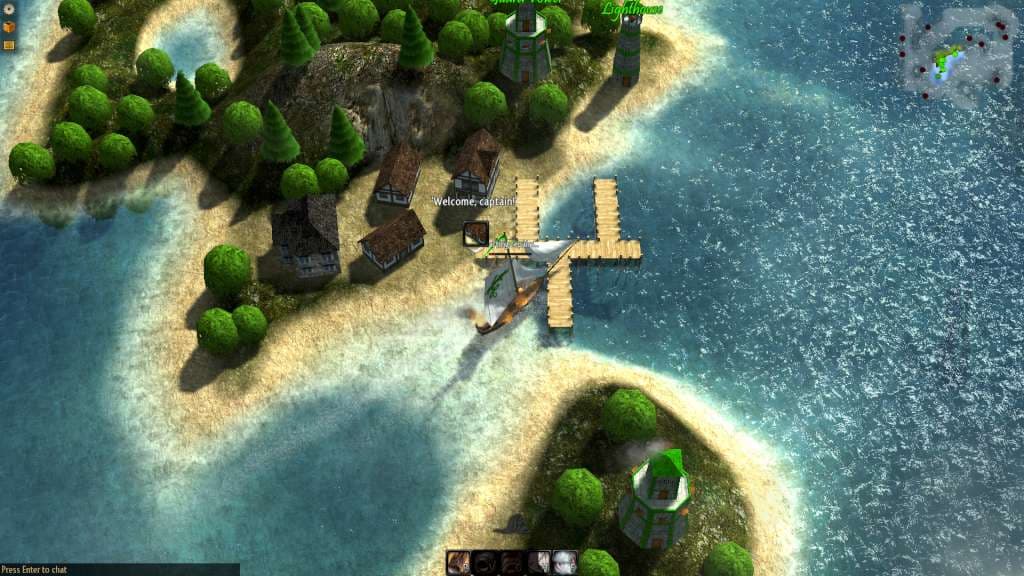
Start by generating a procedural world that will be unique to you, design your own custom faction then sail forward fighting pirates, trading with towns, doing quests or simply exploring -- it's up to you how you want to play.
As you sail about you will find resources you can make use of, upgrades for your ship, new towns that will ask your assistance, and as you get farther out from the starting area -- various pirates that will attempt to take what's rightfully yours.
Combat experience will let you unlock new talents and abilities to make that particular line of work easier.
As you take up consignments with towns and fulfill their production shortages, the towns will grow, offering more quests, more resources and better items.
As the towns continue to grow they will offer you a choice to upgrade your ship itself.
Would you prefer a fast Schooner to explore the world, or a heavy Galleon that's able to take up 5 consignments at once?
Or perhaps a massive Ship of the Line to take the fight with the pirates to their heartlands?
As you explore the world and get farther away from your starting area, the game will become progressively more difficult -- but so will the rewards.
Throughout all of this you can expect the pirates to put up a fair fight, as the AI is bound by the same rules as the player: they have sight, and must explore the map before they can know what's there.
Speaking of AI, build a fearsome reputation and the AI will respect you, even fear you -- avoiding you if at all possible.
Some friendly AI will even choose to follow you and assist you in your own adventures.
And so, on the topic of adventures -- ready to have yours?
System Requirements PC System Requirements OS: Vista Processor: 1.4 GHz dual-core Intel Core i 3 or AMD equivalent Memory: 2 GB RAM Graphics: Intel HD Graphics 4200 Direct X: Version 9.0 c Storage: 250 MB available space Sound Card: Integrated audio Additional Notes: May need to reduce the graphics quality in-game Mac System Requirements OS: OSX 10.7 Processor: 1.4 GHz dual-core Intel Core i 5 Memory: 2 GB RAM Graphics: Intel HD Graphics 4200 Storage: 250 MB available space Sound Card: Integrated audio Additional Notes: Macbook Air runs it smoothly with reduced graphics Linux / Steam OS System Requirements OS: Ubuntu 12.04 Processor: 1.4 GHz dual-core Intel Core i 5 or AMD equivalent Memory: 2 GB RAM Graphics: Intel HD Graphics 4200 Storage: 250 MB available space Sound Card: Integrated audio
Details
- Platform
Steam · PC
- Product type
- CD_KEY
- Region
- GLOBAL
- Genre
- Action, Adventure, RPG, Indie
- Developer
- Tasharen Entertainment Inc.
- Publisher
- Tasharen Entertainment Inc.
- Metacritic Score
- 61/100
- Languages
- 3


How to activate your key on Steam
Open store.steampowered.com and click Install Steam (top-right). Download and run the installer.
Launch Steam, sign in, or create a free Steam account if you do not have one yet.
From the menu bar choose Games → Activate a Product on Steam….
Follow the prompts and enter your product key when asked.
After the key is verified, open LIBRARY, select your title, and click Install to download.